Pitfalls within Cake's Cache engine

For the past week I have been working on a DataSource for the WeGame API. Everything was working fine until I added some logic to cache the results. No matter what I did I received the following fatal error:

//Fatal error: Call to a member function init() on a non-object in C:\xampp\htdocs\cake_1.2.5\cake\libs\cache.php on line 195
// Line 195
$_this->_Engine[$engine]->init($settings);

The error was being thrown from within Cache::set() and it seemed to fail because the actual storage engine object was not instantiated. I spent a good couple hours trying to track down the bug, but to no avail. I tried removing Cache::set(), placing Cache::config() within config/core.php, but still nothing.

Finally I thought to myself "Let me check my Config settings", so I did. I noticed that Cache.disable was set to true, and once I set it to false the whole system worked! Bah, pretty annoying right? I sure love Cake, but its error and exception handling isn't that great. I've ran into so many of these case scenarios where a simple trigger_error() or uncaught exception would of helped (This is for you Cake team *cough*2.0*cough*).

Another thing I would like to note, is that the path option in Cache::config() does not actually create the folder, you must do that manually. Here's how I resolved that problem.

$cachePath = CACHE .'we_game'. DS;
// Create the cache dir
if (!file_exists($cachePath)) {
	$this->Folder = new Folder();
	$this->Folder->create($cachePath, 0777);
}
Cache::config('weGame', array('path' => $cachePath));

Minimalistic approach to class getters and setters

Getters and Setters are the backbone of many PHP classes (or any programming language class), as they allow you to alter and retrieve class properties during runtime. Many well thought and powerful scripts and frameworks make use of Getters and Setters, but is there a thing as too much? Or are there better and easier alternatives? (To make it easier on me to type, and you to read, I will refer to Getters and Setters as GnS from now on.)

By now everyone should know of the Zend Framework. It's a highly customizable and robust system built with multiple components. Zend follows the pure OOP paradigm in which most, if not all classes have an abstract, an interface, and tons of GnS. For a beginner, this might look like a huge cluster of code, as well as being very large in its documentation. But for an advanced user, it could be a god send. Personally, I find Zend's use of GnS to be too much, as it can easily be trimmed down and packaged accordingly.

Before we begin, I want to outline when and how GnS should be used. GnS should be used to alter protected properties only. Why protected you ask? If a property was public, then you can just alter the property manually without the need for a median method (unless of course the method does some manipulation on the argument). If a property is private, then that property should not be altered at all during runtime, as it is data specifically generated/built by the class internally. So that leaves protected properties to act as our configurable properties.

In a typical class, when dealing with the property $_name, you would have a method getName() and setName(). Now imagine you have a class with 15+ properties; you will immediately begin to realize the scale and amount of code required to do GnS. That's where our little friends __set(), __get() and __isset() come in handy. We can easily scale down the code from 30 methods (15 for getting, 15 for setting) to 3. Take the following before and after classes:

// Using individual methods
class User {
    protected $_name;
    protected $_email;
    public function getName() {
        return $this->_name;
    }
    public function setName($value) {
        $this->_name = $value;
    }
    public function getEmail() {
        return $this->_email;
    }
    public function setEmail($value) {
        $this->_email = $value;
    }
}
// Using magic methods
class User {
    protected $_name;
    protected $_email;
    public function __get($property) {
        return (isset($this->{'_'. $property}) ? $this->{'_'. $property} : null);
    }
    public function __set($property, $value) {
        if (isset($this->{'_'. $property})) {
            $this->{'_'. $property} = $value;
        }
    }
    public function __isset($property) {
        return isset($this->{'_'. $property});
    }
}

Does that not look a lot easier? Sure the code looks a bit "hacky", but its perfectly usable and valid code. Of course, there are a few downsides related to this approach. For example, you may want to format a string before assigning it within setName(). With the magic methods you can not do so. But that doesn't stop you from creating a setName(), along side using the magic methods. Furthermore, the get syntax is different; you simply call the property (assuming there is no $name that conflicts with $_name).

// Using individual methods
$name = $User->getName();
$User->setName('Miles');
// Using magic methods
$name = $User->name;
$User->name = 'Miles';
// Times when a set method is needed
public function setName($name) {
    $this->_name = ucall($name);
}

I would like to take this a step further, as I still believe that this is too "cluttered". The next approach solves the problem of conflicting property names, as well as reducing the code required. The approach is straight forward; simply create a global $_config (or $_data, what ever suits you) property that will deal with all the getting and setting of data.

class User {
    protected $_config = array(
        'name' => null,
        'email' => null
    );
    public function __get($property) {
        return (isset($this->_config[$property]) ? $this->_config[$property] : null);
    }
    public function __set($property, $value) {
        if (isset($this->_config[$property])) {
            $this->_config[$property] = $value;
        }
    }
    public function __isset($property) {
        return isset($this->_config[$property]);
    }
}

In the end, it really boils down to the architecture of your application, and your personal coding preferences. Each approach has its pro's and con's, but the best solution (in my mind) is combining them. You would begin by creating the global $_config property, and building the magic methods. If you ever need to customize a get or set, then you create a specific method for it.

Book Review: jQuery Enlightenment

Before I dive on topic, I want to give you all a heads up that I will be posting a review of the book: "AJAX and PHP: Building Modern Web Applications 2nd Edition", by Packt Publishing. So far the book is great and has some nice chapters about jQuery, JSON, PHP and even XAMPP.

Now jQuery Enlightenment (jQE) isn't much of a book as it is a helpful PDF. It's not as long as your typical book, but it gets the job done in explaining jQuery and its core components. The topics that are covered in jQE range from Selectors, Traversal, DOM and Manipulation, Forms, Events, Plugins, AJAX, the Core and much more. The current edition of the book covers jQuery 1.3.2, and since 1.4 recently came out, I'm going to note any differences or problems that can be solved using 1.4 (if there are any).

The document is only a mere 123 pages (PDF pages to be precise), which may sound like a lot, but in actuality it isn't. Each chapter of jQE comes with code snippets, which have links to JsBin.com that allow you to run and test the snippet yourself. The snippets are also color coded to represent which areas of the code you should be focusing on and understanding. These features were probably the greatest thing about jQE and what sets it apart from regular books. It allows you to interact with the code first hand and makes it easier to understand once you see it in action (and you don't have to manually write it all too!). One caveat though is that the snippets use alert() for testing purposes, as they didn't want to rely on you having Firebug installed.

The book begins by talking about the jQuery core, of course. It states that jQuery should only be used in HTML standards mode, and not in quirks mode, as it has problems with rendering. One great aspect that I liked is its explanations of do's and don'ts and how to properly use jQuery to its full advantage. An example of this is to use the built in short hand code, and when to properly bind and invoke certain event handlers.

// You can get the current jQuery version by using the jQuery property
var version = $().jquery; // or $.fn.jquery

A feature that I rarely use (but probably should) is deep chaining. What I mean about deep chaining is using the find() function, paired with end(). I personally prefer just calling the functions separately on the specific jQuery objects. Regardless, jQE also made use of detailing out when and how this should be used and in what context (especially helpful for callbacks and special functions). While re-reading over the selectors chapters, I can't help but think to my self "A lot of this would be easier in 1.4 with the new functions, has() and not().", but you can still create your own selection filters (which is awesome).

// Define custom filter by extending $.expr[':']
$.expr[':'].positionAbsolute = function(element) {
	return $(element).css('position') === 'absolute';
};
var divs = $('div:positionAbsolute');

I always forget that you can create your own selection filters (just a reminder to myself!). Back on topic, jQE gets more in depth and accompanies it with more examples, so a must read if you are interested in such techniques. I bet you didn't know that you can nest filters as well:

var divs = $('div:not(:has(.jQuery))');
var ps = $('p').filter(':not(:first):not(:last)');

Moving on, the chapters on traversal are really well done, as it talks about rarely used functions like andSelf() and contents() (to me at least). However, I really feel like the forms chapter could of been a bit more in depth. It described how to properly select radios, checkboxes, selects, etc, but I felt as if something was missing. I noticed that when talking about getting/setting values for selects, that jQE might be wrong or out of date, as I am able to set the value of a select by passing the "value" tag of the option, and not the text. Maybe this has been updated in newer versions of jQuery, or I'm just blind. Besides that little mishap, it provides some great examples on how to select certain options based on the selection filters (pretty nifty!).

$('#select option:not(':selected')');

When talking about events and binds, it was pretty straight forward. Events in itself aren't that complicated to understand, especially in jQuery. However, there was one minor feature I didn't know about, and that was passing an empty bind function will trigger the previous bind.

// Alert will automatically trigger since we are passing an empty click()
$('a').click(function(){ alert('Its black magic!') }).click();

Actually, I just got a bit ahead of myself. There are some pretty exciting things you can do with events, like event specific namespacing, and using the event object functions (preventDefault(), stopPropagation(), etc). I won't get into this subject, as you should purchase jQE and find it out for yourself! Oh, did you also know that you can disable the right click menu in your browser (not in Opera, sorry guys!), by simply using jQuery? Me neither!

$(document).bind('contextmenu', function() { 
	return false;
});

Now for the bigger topics, Plugins, Effects amd AJAX. jQE covers the basics on how to properly write and create a basic skeleton for your plugins. It goes over the correct usage and context for this, how to apply the plugin to all selected elements with the each command, how to return and chain properly and how to easily extend and creating custom settings. Now that's basically all it talks about, which I think was too short. I've seen so many different variations and usages for jQuery plugins, and so many of them wrote it differently. For example, Ive seen people define functions within the each() loop, as well as outside the loop scope. I'm assuming this sets the visibility to private so that the functions can not be called, but what if I do want to call a plugin function?

$.fn.myPlugin.someFunction = function() { 
	// Do something 
}

Is it possible for me to call this function outside of the plugin, or does a plugin only package everything and do it automatically. There was too many "What if", "How does" type questions I was thinking to myself, and jQE was unable to answer. But these type of questions are probably best asked in larger more in depth books.

I don't want to keep boring you with minor details, and I would like to leave the chapters on AJAX and Effects alone (aka the exciting ones). By doing so, I hope you go purchase this document and read it for yourself. I promise you won't be disappointed.

Besides a few minor gripes and unanswered questions, jQE delivered everything I needed to know on how to properly use jQuery. It did its best to go into detail, and to also describe how the internals are working. I personally liked the fact that the document was littered with multiple examples on how to optimize and write fast code. A quick example for your enjoyment (and you may have not known that you can pass objects as an argument!).

$('a').css({'display': 'block', 'color': 'red'}).attr({'title': 'Title Txt', 'href': 'http://www.jquery.com'});

All in all, this was a great book to start learning jQuery. However, there was one thing I completely disliked, and it was when the book prefixed variables with a $ ($var), ugh! Sorry, this is Javascript, not PHP!

In closing, be prepared for my next review on AJAX and PHP: Building Modern Web Applications 2nd Edition, as I know some of my readers will enjoy it (yes you!).
Element creation in jQuery 1.4

Before I start, I'd like to say hats off to the jQuery team, as 1.4 is looking beautifully so far. I've already ran into about 3 problems that were fixed with the new features in 1.4, like the parentsUntil() function. However, the post today will be about the new element creation system using the core jQuery method, $(). In 1.4 you can now create an element by passing the tag name as the first parameter, and an object of attributes as the second. The parameters should be a named value pair of attributes to be appended to the element, like the ID, class, value, title, text, etc. View more about it in the official documentation.

var input = $('<input>', {
	id: 'FormUsername',
	name: 'username',
	type: 'text',
	value: 'Enter your username...',
	focusin: function() {
		$(this).val('');
	}
}).appendTo(someElement);

This new approach opens up tons of new opportunities and uses, compared to the previous usage of writing out the whole element, or doing it the old school way with document.createElement().

// We don't need you anymore outdated code!
var input = $('<input type="text" id="FormUsername" name="username" value="Enter your username..." />').focusin(function() {
	$(this).val('');
}).appendTo(someElement);
var input = document.createElement('input');

Just earlier today I needed a way to dynamically create specific elements, with a specific set of attributes. This new functionality allows me to easily do that by just passing an object, and wallah! Here's just a quick example of some of the usages. It can get quite handy when you need to loop through objects/arrays and create elements accordingly.

// Some data returned from an AJAX call
var data = jsonObj;
// Loop it and build the fields!
$.each(data, function(key, params) {
	var parent = $('<div>', {
		id: 'Comment_'+ params.id,
		text: params.message
	}).addClass(params.className);
	var child = $('<a>', {
		href: '/user/profile/'+ params.user_id,
		text: params.username
	}).prependTo(parent);
	parent.appendTo('#comments');
});

In the code above we are getting a list of comments as a JSON object, then iterating over the object and dynamically creating the elements. Albeit this is just a quick and dirty example, as it would be best to just have the AJAX spit out the HTML, but you get the picture.

You may have noticed that I used addClass() on the parent instead of declaring a param of "class". You can use class, but class must be quoted as it causes problems in IE (of course). Personally, I just stick to addClass() as it will not cause any problems in any browser. Furthermore, if you want to apply some content text (like the link text, not the title), you would pass a param of "text".

The new element creation is just one of the more awesome features in jQuery 1.4. I hope you guys enjoy it as much as I am; and if you are not yet, get to it! What are you waiting for??

Restricting an input field to numeric only

I was always amazed that a feature like this wasn't available in HTML 4 (but is in HTML 5). It would be really cool to restrict an input field to only accept numeric characters (or alphabetic), without the need for JavaScript. But I digress as I had to use JavaScript anyways. I first tried to steer away from using an event, but found it difficult to not allow the letter without it showing up in the input field first, or finding it too strange to regex the non-numeric characters out. So I caved in and used the event handlers. Here's a quick JavaScript snippet that will make an input field only accept numeric characters, a backspace and a tab.

function numericOnly(event) {
	var key = window.event.keyCode || event.keyCode;
	return ((key >= 48 && key <= 57) || (key >= 96 && key <= 105) || (key == 8) || (key == 9));
}

The function will accept the 0-9 range of numbers and all numbers on the numlock keypad. However, this will not work in all locales since some keyboard layouts are different but will work on all basic QWERTY keyboards. Finally, to implement the function, you would use onkeydown, as it checks the event before the character shows up (unlike onkeyup or onkeypress).

<input name="field" onkeydown="return numericOnly(event);" />

There are probably better and more thought out alternatives, so if you have one please post it in the comments. Would be nice to get multiple variations.

Retrieving tables within your Cake database

I have been working lately on adding an installation process to my forum plugin. For this process I needed a way to retrieve a list of tables within a selected database, to make sure there are no table name conflicts. After asking the question on Twitter, I got the answer thanks to @pierremartin and @mark_story (of course!). You simply use the ConnectionManager class.

$db = ConnectionManager::getDataSource('default');
$tables = $db->listSources();

Very handy, and a lot easier then writing a custom query with execute().

GitHub, my new home

As I mentioned in my previous posts, I took the jump and moved over to GitHub. I moved over to a public repository system to make it easier on me pushing my code changes to the public (the current download system on my site isn't too intuitive). So over the past few weeks I have been slowly adding all my scripts to GitHub and pushing the code. Additionally, I have been uploading the old zipped versions of the scripts, which can be found on the respective repo's downloads page. I would of done and SVN import into Git, but it kept stalling every time I did so, oh well!

With the move to GitHub, I have updated all the download links and buttons on the site. It either asks you to download the files, or clone the repo (both of which will bring you to do the GitHub page). I do miss my download counter though... I really wish GitHub had a total downloads/clones feature.

Anyways, you can find my GitHub at the user milesj. I will be pushing all my changes and code here from now on using Git, but will still keep updating the change log on this site, and posting announcements about it. Now get to cloning!

Installing GitExtensions for Windows

I have been trying to get into Git for a while now, but with its lack (or terrible) support on Windows, I ignored it. I tried doing the stand alone CLI, but I don't like CLI, so I abandoned it. I tried using TortoiseGit, but wasn't too fond of still trying to get SHH or Putty integrated nicely. I want something that does it all for me, without me having to configure or do anything (or maybe I just completely did it wrong, or was using an old build). Along came GitExtensions in all its glory. It came packaged with everything I needed: Putty/SSH integration, repository management, GitHub support (remote features), and all the other awesome minor features. I mean it even has a CLI, if I ever wanted to use it.

The installation process was straight forward and painless. I will run you through the installation process and how to get GitExtensions working on Windows. Once done, you should be ready to dive into Git head on. I took the time to add screenshots of the installation process to aide you on.

Downloading

Well the first step of course is downloading the program. You can download it from the projects page. Personally I would go with the full installer (MSysGit, KDiff3 and PuTTy built in), so that you do not have to do all those separately yourself. Once downloaded, just execute the file and follow the steps.

Installation

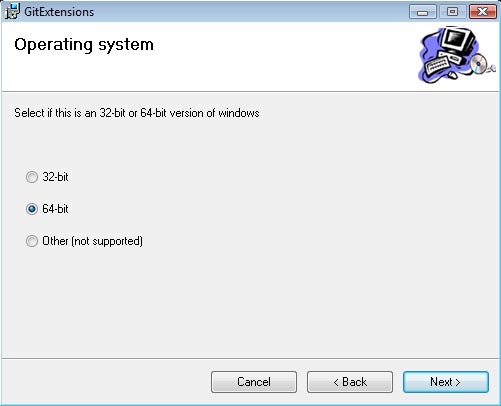
Its important that you go through the installer slowly, and select your proper configuration. For example, I am on a 64-bit computer, so I will be choosing the 64-bit option.

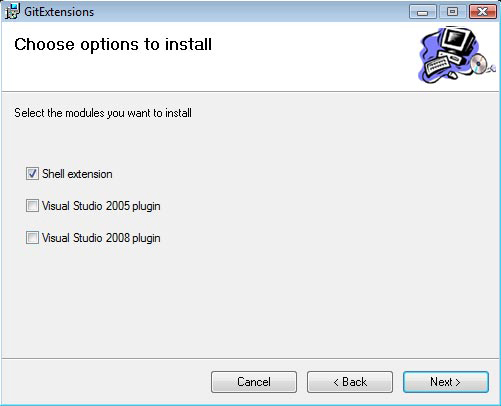
You should next be asked where to store the files, I kept them in its default location within the "Program Files". On the next screen it gives you a list of checkboxes for "Shell Extension" and "Visual Studio". If you are not going to be using the Visual Studio integration, do not check these boxes, however Shell Extension should be checked.

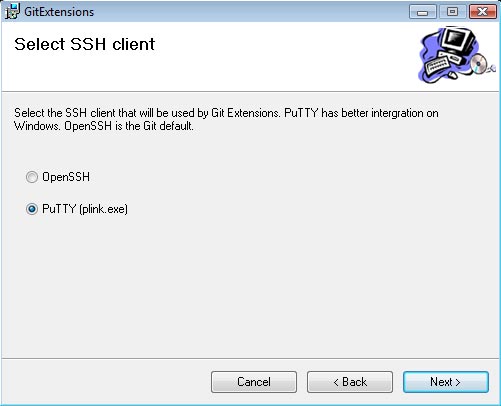
The next setting should be for your SSH support. Personally I have always used PuTTy, so I went with PuTTy (and the integration works perfect so far). If you are a fan of OpenSSH, then by all means go with what your comfortable and use to.

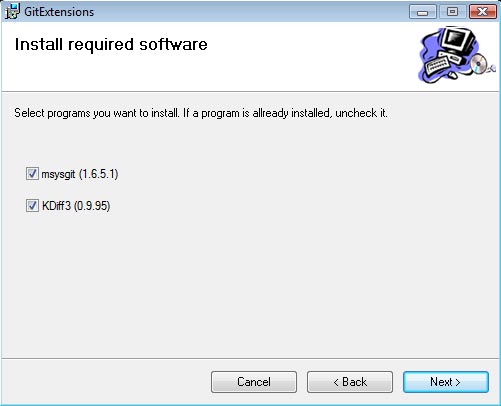
The final screen should be a list of required components to install. MSysGit is the base of Git, so make sure that it is checked off (if you already have it installed, you do not need to check it). KDiff3 is used for revision history allowing you to see changes, merges, etc between 2 file states. I have yet to use this feature, but its nice to have if you are working on a repository with multiple users. It also doesn't hurt to install it anyways. Once you are finished, click next to start the installation process.

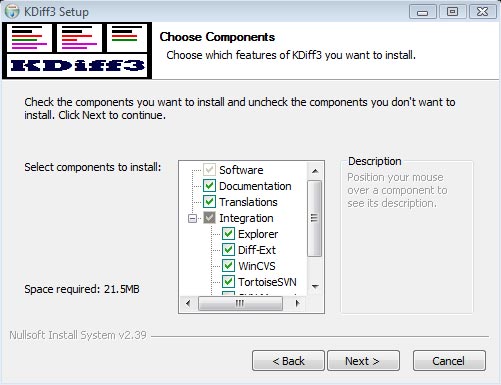
During the installation process, it will prompt you to select your language, and will install the selected components. I kept all the default settings and locations for the KDiff installation, but you are welcome to change them.

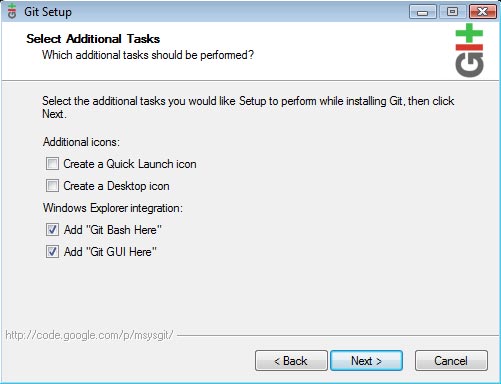
And finally, we get to install Git itself. You can just keep clicking "Next" to continue with the default installation. You will get to a screen with the options for "Add Git Bash Here" and "Add Git GUI Here". These settings add menus to your Windows Explorer right click menu, and will open up the CLI/GUI on the selected folder. They are not really mandatory, but its safe to keep them. The "Quick Launch" and "Desktop icon" checkboxes are not required, seeing as how we will never use Git stand-alone, but through GitExtensions, so you may uncheck them.

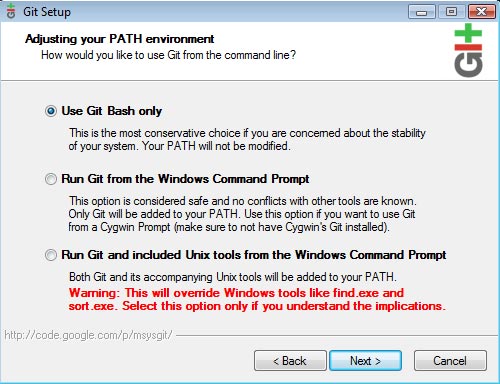
The next screen is important. You should keep "Use Git bash only" checked and not use the other options (unless you are familiar with these settings).

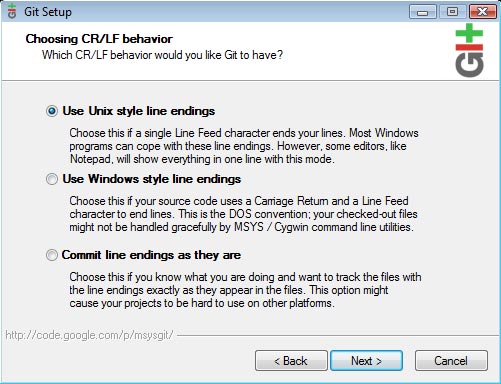
Git allows you to parse the correct line endings during each push. Personally I go with the "Unix style" line endings because my online servers are Linux boxes. These settings are entirely up to your environment, so choose which works best.

Completion

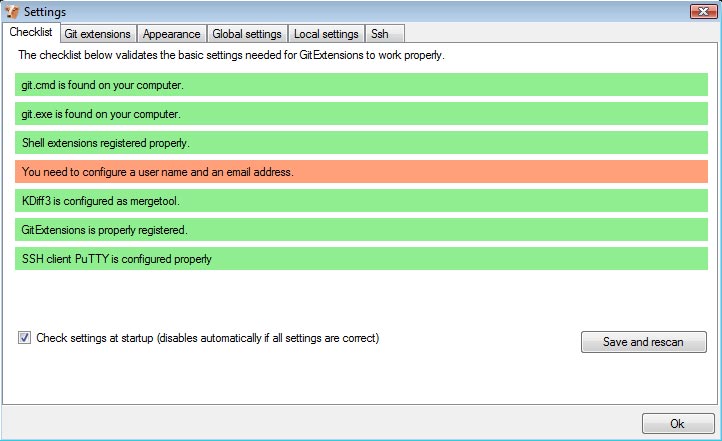
GitExtensions, alongside with MSysGit, KDiff and PuTTy should all be installed now. The next step is to launch GitExtensions and configure it to your needs. You should receive the following prompt.

All of the bars should be green if everything installed correctly, excluding the username/email bar. You will need to update the global settings with that information. You can do so by clicking on the orange bar, filling out the input fields and hitting OK. Once you have hit OK, you are finished, and a prompt will open up with buttons for "Open Repository", "Clone Repostory" and "Create Repository".

I hope this helped in your endeavor to use Git on Windows! I will discuss those 3 buttons in more detail within my next post. For the time being, everything should be installed correctly and you can begin messing around with GitExtensions. Enjoy!